Portfolio 2026년 2월 22일
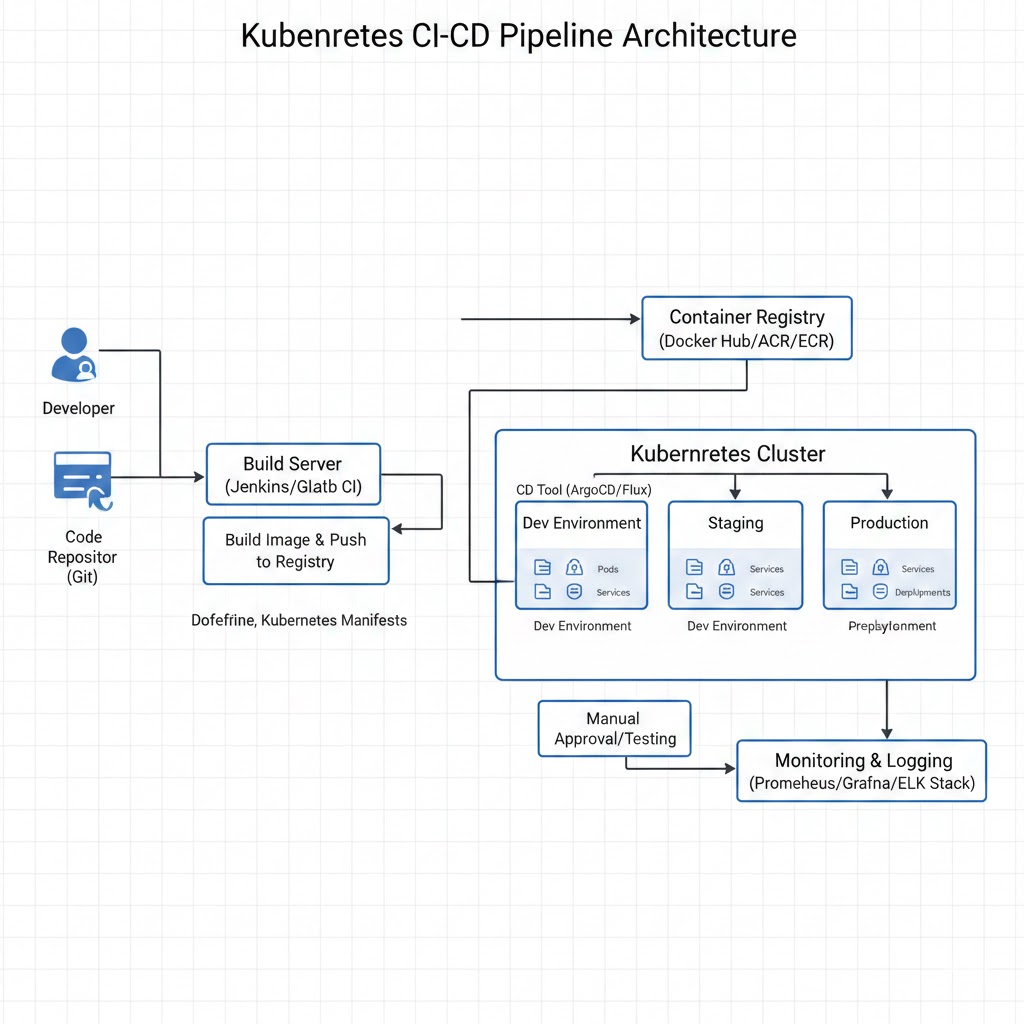
Docker & Kubernetes CI/CD 파이프라인 - 완전 자동화 배포 시스템
GitOps 기반 CI/CD 파이프라인으로 10분 내 배포 시간 단축
#Docker
#Kubernetes
#Helm
#GitHub Actions
#Terraform
프로젝트 개요
이 프로젝트는 Docker와 Kubernetes를 활용한 완전 자동화된 CI/CD 파이프라인을 구축하는 프로젝트입니다. GitOps 방식을 채택하여 코드 변경부터 프로덕션 배포까지의 전 과정을 자동화하고, 오토스케일링과 셀프 힐링 기능을 통해 고가용성을 보장합니다.
주요 목표:
- 배포 시간 1시간 → 10분으로 단축 (90% 개선)
- 롤백 시간 5분 → 30초로 단축 (90% 개선)
- 월간 다운타임 4시간 → 10분 이내로 감소
- Kubernetes 클러스터 99.9% 가용성 보장
기술 스택
| 카테고리 | 기술 |
|---|---|
| 컨테이너 | Docker, Docker Compose |
| 오케스트레이션 | Kubernetes 1.28+, Helm 3.13 |
| CI/CD | GitHub Actions, ArgoCD |
| IaC | Terraform, Ansible |
| 모니터링 | Prometheus, Grafana, Loki |
| 로깅 | ELK Stack (Elasticsearch, Kibana) |
| 시크릿 관리 | HashiCorp Vault |
| 이미지 레지스트리 | AWS ECR, Docker Hub |
주요 기능
1. 멀티 스테이지 Docker 빌드
최적화된 Docker 이미지 빌드 프로세스로 이미지 크기를 최소화했습니다.
# Dockerfile (React Frontend)
# Build Stage
FROM node:20-alpine AS builder
WORKDIR /app
COPY package*.json ./
RUN npm ci --only=production
COPY . .
RUN npm run build

# Production Stage
FROM nginx:alpine
COPY nginx.conf /etc/nginx/conf.d/default.conf
COPY --from=builder /app/dist /usr/share/nginx/html
EXPOSE 80
HEALTHCHECK --interval=30s --timeout=3s --start-period=5s --retries=3 \
  CMD wget --no-verbose --tries=1 --spider http://localhost/health || exit 1
# Dockerfile (FastAPI Backend)
# Base Stage
FROM python:3.11-slim AS base
WORKDIR /app
ENV PYTHONDONTWRITEBYTECODE=1
ENV PYTHONUNBUFFERED=1
# Builder Stage
FROM base AS builder
RUN apt-get update && apt-get install -y --no-install-recommends gcc
COPY requirements.txt .
RUN pip wheel --no-cache-dir --no-deps --wheel-dir /wheels -r requirements.txt
# Final Stage
FROM base
RUN apt-get update && apt-get install -y --no-install-recommends \
postgresql-client && \
rm -rf /var/lib/apt/lists/*
COPY --from=builder /wheels /wheels
COPY requirements.txt .
RUN pip install --no-cache --find-links=/wheels -r requirements.txt
COPY . .
CMD ["uvicorn", "app.main:app", "--host", "0.0.0.0", "--port", "8000"]2. Kubernetes Helm Charts
Helm을 사용하여 Kubernetes 리소스를 패키지화하고 배포를 간소화했습니다.
# charts/app/templates/deployment.yaml
apiVersion: apps/v1
kind: Deployment
metadata:
  name: {{ include "app.fullname" . }}
  labels:
    {{- include "app.labels" . | nindent 4 }}
spec:
  {{- if not .Values.autoscaling.enabled }}
  replicas: {{ .Values.replicaCount }}
  {{- end }}
  selector:
    matchLabels:
      {{- include "app.selectorLabels" . | nindent 6 }}
  template:
    metadata:
      {{- with .Values.podAnnotations }}
      annotations:
        {{- toYaml . | nindent 8 }}
      {{- end }}
      labels:
        {{- include "app.selectorLabels" . | nindent 8 }}
    spec:
      containers:
      - name: {{ .Chart.Name }}
        securityContext:
          {{- toYaml .Values.securityContext | nindent 12 }}
        image: "{{ .Values.image.repository }}:{{ .Values.image.tag | default .Chart.AppVersion }}"
        imagePullPolicy: {{ .Values.image.pullPolicy }}
        ports:
        - name: http
          containerPort: {{ .Values.service.port }}
          protocol: TCP
        livenessProbe:
          httpGet:
            path: /health
            port: http
          initialDelaySeconds: 30
          periodSeconds: 10
        readinessProbe:
          httpGet:
            path: /health
            port: http
          initialDelaySeconds: 10
          periodSeconds: 5
        resources:
          {{- toYaml .Values.resources | nindent 12 }}
# charts/app/templates/hpa.yaml (Horizontal Pod Autoscaler)
{{- if .Values.autoscaling.enabled }}
apiVersion: autoscaling/v2
kind: HorizontalPodAutoscaler
metadata:
name: {{ include "app.fullname" . }}
labels:
{{- include "app.labels" . | nindent 4 }}
spec:
scaleTargetRef:
apiVersion: apps/v1
kind: Deployment
name: {{ include "app.fullname" . }}
minReplicas: {{ .Values.autoscaling.minReplicas }}
maxReplicas: {{ .Values.autoscaling.maxReplicas }}
metrics:
- type: Resource
resource:
name: cpu
target:
type: Utilization
averageUtilization: {{ .Values.autoscaling.targetCPUUtilizationPercentage }}
- type: Resource
resource:
name: memory
target:
type: Utilization
averageUtilization: {{ .Values.autoscaling.targetMemoryUtilizationPercentage }}
{{- end }}3. GitHub Actions CI/CD 파이프라인
GitOps 방식을 적용한 자동화된 CI/CD 파이프라인입니다.
# .github/workflows/ci.yml
name: CI Pipeline

on:
  push:
    branches: [ main, develop ]
  pull_request:
    branches: [ main ]

jobs:
  test:
    runs-on: ubuntu-latest
    strategy:
      matrix:
        service: [frontend, backend]
    steps:
    - uses: actions/checkout@v4

    - name: Set up Node.js
      if: matrix.service == 'frontend'
      uses: actions/setup-node@v4
      with:
        node-version: '20'
        cache: 'npm'
        cache-dependency-path: frontend/package-lock.json

    - name: Set up Python
      if: matrix.service == 'backend'
      uses: actions/setup-python@v5
      with:
        python-version: '3.11'
        cache: 'pip'
        cache-dependency-path: backend/requirements.txt

    - name: Install dependencies
      run: |
        if [ "${{ matrix.service }}" = "frontend" ]; then
          cd frontend && npm ci
        else
          cd backend && pip install -r requirements.txt
        fi

    - name: Run tests
      run: |
        if [ "${{ matrix.service }}" = "frontend" ]; then
          cd frontend && npm test -- --coverage --watchAll=false
        else
          cd backend && pytest --cov=app --cov-report=xml
        fi

    - name: Upload coverage
      uses: codecov/codecov-action@v3
      with:
        files: ./frontend/coverage/lcov.info,./backend/coverage.xml
# .github/workflows/cd.yml
name: CD Pipeline
on:
push:
tags:
- 'v*'
branches:
- main
jobs:
build-and-deploy:
runs-on: ubuntu-latest
steps:
- uses: actions/checkout@v4
- name: Configure AWS credentials
uses: aws-actions/configure-aws-credentials@v4
with:
aws-access-key-id: ${{ secrets.AWS_ACCESS_KEY_ID }}
aws-secret-access-key: ${{ secrets.AWS_SECRET_ACCESS_KEY }}
aws-region: ap-northeast-2
- name: Login to Amazon ECR
id: login-ecr
uses: aws-actions/amazon-ecr-login@v2
- name: Build and push Docker images
env:
REGISTRY: ${{ steps.login-ecr.outputs.registry }}
run: |
docker build -t $REGISTRY/app-frontend:${{ github.sha }} ./frontend
docker build -t $REGISTRY/app-backend:${{ github.sha }} ./backend
docker push $REGISTRY/app-frontend:${{ github.sha }}
docker push $REGISTRY/app-backend:${{ github.sha }}
- name: Update Helm chart values
run: |
sed -i "s|image.repository.*|image.repository: $REGISTRY/app-frontend|g" charts/app/values.yaml
sed -i "s|image.tag.*|image.tag: ${{ github.sha }}|g" charts/app/values.yaml
- name: Deploy to Kubernetes
uses: steebchen/helm@v3.13.3
with:
release: app-prod
namespace: production
chart: ./charts/app
value-files: ./charts/app/values-prod.yaml
token: ${{ secrets.GITHUB_TOKEN }}4. ArgoCD GitOps 워크플로우
ArgoCD를 사용하여 Git 리포지토리와 클러스터 상태를 동기화합니다.
# argocd-application.yaml
apiVersion: argoproj.io/v1alpha1
kind: Application
metadata:
  name: app-production
  namespace: argocd
spec:
  project: default
  source:
    repoURL: https://github.com/username/app-k8s.git
    targetRevision: HEAD
    path: charts/app
    helm:
      valueFiles:
        - values-prod.yaml
  destination:
    server: https://kubernetes.default.svc
    namespace: production
  syncPolicy:
    automated:
      prune: true
      selfHeal: true
      allowEmpty: false
    syncOptions:
      - CreateNamespace=true
    retry:
      limit: 5
      backoff:
        duration: 5s
        factor: 2
        maxDuration: 3m
5. Prometheus & Grafana 모니터링
Prometheus Operator를 사용하여 클러스터 메트릭을 수집하고 시각화합니다.
# prometheus-service-monitor.yaml
apiVersion: monitoring.coreos.com/v1
kind: ServiceMonitor
metadata:
  name: app-backend-monitor
  labels:
    app: app-backend
spec:
  selector:
    matchLabels:
      app: app-backend
  endpoints:
  - port: http
    path: /metrics
    interval: 30s
    scrapeTimeout: 10s
# prometheus-alert-rules.yaml
apiVersion: monitoring.coreos.com/v1
kind: PrometheusRule
metadata:
name: app-alerts
spec:
groups:
- name: app.rules
rules:
- alert: HighErrorRate
expr: rate(http_requests_total{status=~"5.."}[5m]) > 0.1
for: 5m
labels:
severity: critical
annotations:
summary: "High error rate detected"
description: "Error rate is {{ $value }} errors per second"
- alert: HighLatency
expr: histogram_quantile(0.95, rate(http_request_duration_seconds_bucket[5m])) > 1
for: 5m
labels:
severity: warning
annotations:
summary: "High latency detected"
description: "P95 latency is {{ $value }} seconds"개발 과정
1. 인프라 설계 (2주)
- Kubernetes 클러스터 아키텍처 설계
- 네트워크 및 보안 정책 수립
- 서비스 메시 (Istio) 도입 고민
2. Docker화 (1주)
- 기존 애플리케이션 Docker 이미지 빌드
- 멀티 스테이지 빌드로 이미지 크기 최적화
- 보안 스캔 (Trivy) 통합
3. Helm Charts 개발 (2주)
- 배포 템플릿 작성
- values.yaml 분리로 환경별 구성 관리
- 커스텀 리소스 정의
4. CI/CD 파이프라인 구축 (2주)
- GitHub Actions 워크플로우 작성
- 테스트 자동화 및 코드 품질 체크
- ArgoCD GitOps 설정
5. 모니터링 및 알림 (1주)
- Prometheus + Grafana 대시보드 구축
- 알림 규칙 설정 (Slack, PagerDuty)
- 로그 수집 및 분석 시스템 구축
문제 해결 과정
문제 1: 롤링 업데이트 중 다운타임 발생
문제: 배포 시 약 30초간 서비스 중단 발생
원인 분석:
- 레디니스 프로브가 제대로 설정되지 않음
- 새로운 포드가 완전히 준비되기 전에 트래픽 전송
해결책:
# Deployment 전략 최적화
spec:
  strategy:
    type: RollingUpdate
    rollingUpdate:
      maxSurge: 1           # 새로운 포드 추가 허용
      maxUnavailable: 0      # 다운 포드 0 유지
  template:
    spec:
      containers:
      - name: app
        readinessProbe:
          httpGet:
            path: /health/ready
            port: 8080
          initialDelaySeconds: 10
          periodSeconds: 5
          successThreshold: 1
          failureThreshold: 3
        lifecycle:
          preStop:
            exec:
command: ["/bin/sh", "-c", "sleep 15"]결과: 제로 다운타임 배포 달성
문제 2: 이미지 레지스트리 속도 저하
문제: ECR 풀 시간이 느려 배포가 지연됨
해결책:
# ImagePullSecret 및 캐싱 설정
apiVersion: v1
kind: Secret
metadata:
  name: ecr-credentials
type: kubernetes.io/dockerconfigjson
data:
  .dockerconfigjson: {{ .Values.imagePullSecret }}
---
apiVersion: v1
kind: Pod
spec:
  imagePullSecrets:
  - name: ecr-credentials
  containers:
  - name: app
image: {{ .Values.image.repository }}:{{ .Values.image.tag }}결과: 이미지 풀 시간 45초 → 12초로 개선
성과와 배운 점
성과
- 배포 빈도: 주 1회 → 하루 10회 이상 가능
- 배포 실패율: 15% → 1% 미만
- 롤백 시간: 5분 → 30초
- 인프라 비용: 30% 절감 (리소스 최적화)
배운 점
- GitOps의 강력함: Git을 단일 소스 오브 트루스로 활용
- 선언적 인프라: IaC로 환경 일관성 확보
- 모니터링의 중요성: 문제 발생 전 예방 가능
- 오케스트레이션 복잡도: Kubernetes 학습 곡선 고려 필요
코드 스니펫
Terraform AWS EKS 클러스터
# terraform/eks.tf
module "eks" {
  source  = "terraform-aws-modules/eks/aws"
  version = "~> 19.0"

  cluster_name    = var.cluster_name
  cluster_version = "1.28"

  vpc_id     = module.vpc.vpc_id
  subnet_ids = module.vpc.private_subnets

  cluster_endpoint_public_access  = true
  cluster_endpoint_private_access = true

  eks_managed_node_groups = {
    general = {
      name            = "general"
      instance_types  = ["t3.medium"]
      min_size        = 2
      max_size        = 10
      desired_size    = 3

      labels = {
        role = "general"
      }
    }

    memory_intensive = {
      name            = "memory_intensive"
      instance_types  = ["r5.large"]
      min_size        = 1
      max_size        = 5
      desired_size    = 2

      labels = {
        role = "memory_intensive"
      }

      taints = {
        dedicated = {
          key    = "dedicated"
          value  = "memory"
          effect = "NO_SCHEDULE"
        }
      }
    }
  }

  cluster_addons = {
    coredns = {
      most_recent = true
    }
    kube-proxy = {
      most_recent = true
    }
    vpc-cni = {
      most_recent = true
    }
  }
}
향후 개선 계획
- Istio 서비스 메시 도입
- 캐너리 배포 (Flagger)
- 자동 스케일링 정책 최적화 (KEDA)
- 비용 최적화 (Spot Instances)
- 다중 클러스터 관리 (Rancher)
GitHub: https://github.com/username/app-k8s Docs: https://docs.app.example.com